

What Is Ford Co-Pilot360, and How Does It Work?
Ford Co-Pilot360 is Ford’s driver-assistance technology package designed to help you feel more in control behind the wheel while driving around Oracle. These systems use advanced radar, cameras, and optical sensors to monitor the area around your vehicle for potential hazards. When a possible issue is detected, the system can alert you with visual and audio cues. In certain situations, it can also provide emergency braking or gentle steering support to help reduce the impact of or avoid a collision.
At ORO Ford, many of our customers ask, “How does Ford Co-Pilot360 work?” Our team put together this guide to explain the main Ford Co-Pilot360 features and the added confidence they can provide on the road.
Blind Spot Information System (BLIS) With Cross-Traffic Alert
Ford’s BLIS with Cross-Traffic Alert uses sensors mounted on the rear bumper that face backward and outward. The system becomes active at about 3 mph and stays active until the vehicle is turned off. If another vehicle enters your blind spot, an indicator light appears in the corresponding side mirror and stays illuminated while that vehicle remains there.
Cross-Traffic Alert works when you are backing up. If a vehicle approaches from either side while you are in reverse, you will hear a chime and see a visual alert in the message center showing which side the vehicle is coming from.
Lane-Keeping System for Safer Highway Driving
The lane-keeping system uses a forward-facing camera mounted near the top of the windshield to monitor the lane markings on the road. Ford’s system has three main modes.
In Lane-Keeping Aid mode, the vehicle can apply gentle steering input to help guide you back toward the center of the lane when drift is detected.
In Lane-Keeping Alert mode, the steering wheel vibrates when the system senses you drifting, similar to the feeling of driving over rumble strips.
A Driver Alert mode can also display a message encouraging you to take a break after repeated lane warnings. Aid and Alert can be used separately or together.
Ford’s lane-keeping system typically works above 40 mph as long as at least one lane marking is visible, making it a helpful partner on highway drives such as an I-10 commute through Tucson in your Ford Mustang Mach-E.
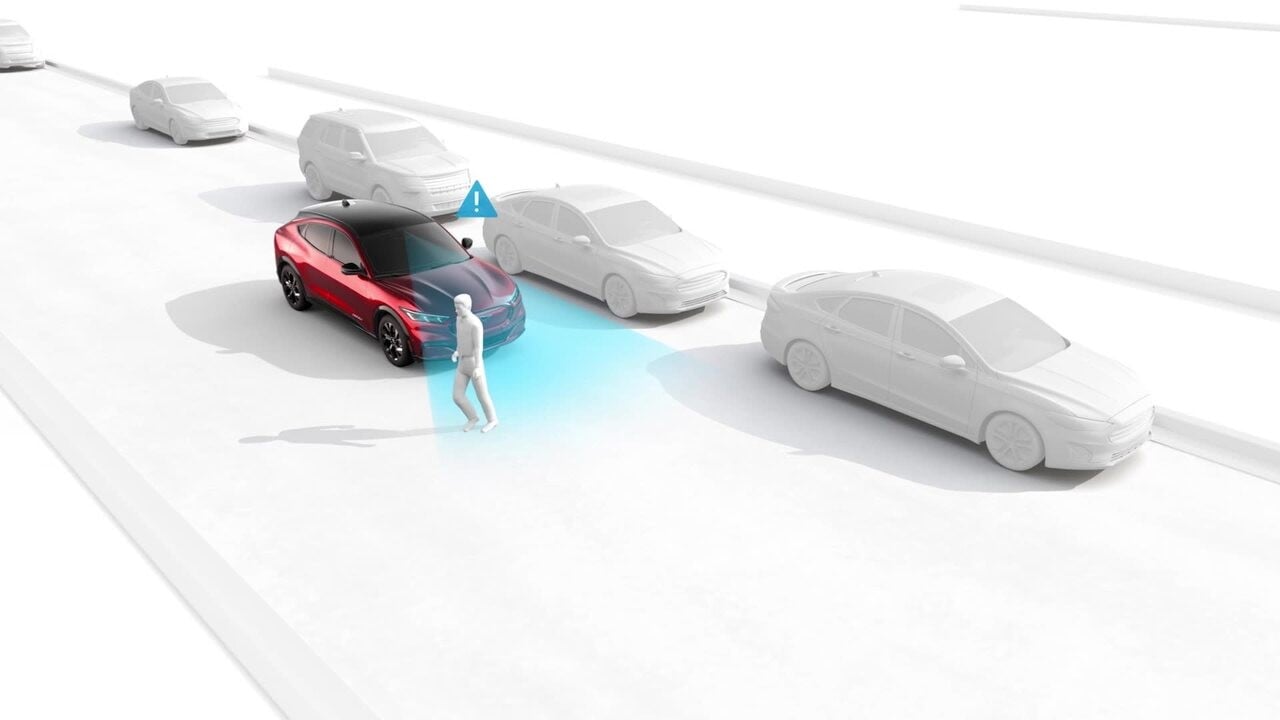
Pre-Collision Assist With Automatic Emergency Braking
Forward-facing sensors can help detect potential collisions with pedestrians and vehicles ahead. If the system senses a likely collision, it can flash a warning, sound an alert, and apply the brakes if needed. This feature is designed to help reduce the severity of or possibly avoid certain frontal collisions.
If you respond slowly, Automatic Emergency Braking can precharge the brakes and increase brake-assist sensitivity to help you get full response when you do press the pedal. If you do not brake and the system determines a collision is imminent, it can automatically apply braking.
Sensitivity can usually be set to High, Normal, or Low. Ford generally recommends the High setting for the strongest response.
Adaptive Cruise Control With Stop-and-Go
Ford’s Adaptive Cruise Control with Stop-and-Go lets you set your desired speed and following distance from the vehicle ahead. Using cameras and radar, the system can track traffic flow and automatically adjust your speed to maintain that gap, even bringing the vehicle to a complete stop when traffic does.
You can activate Adaptive Cruise Control by selecting Driver Assist in the instrument cluster, then Cruise Control, and then Adaptive. If you prefer standard cruise control, you can select the conventional setting instead.
Once activated, you can set your speed using the steering-wheel controls. The indicator changes from white to green once a speed is set. You can cancel the system at any time by pressing the CNCL button or by applying the brakes.
Rear View Camera and Parking Assist Technologies
Ford’s rear-view camera and parking assist technologies can make it easier to maneuver a Ford Expedition in tighter spaces such as crowded parking lots. When you shift into reverse, the camera shows a live image on the center display. Grid lines help you judge distance, and the system beeps faster as you get closer to an object.
Some Ford vehicles also offer an available 360-degree camera system that creates an overhead-style image of the vehicle and its surroundings using cameras positioned around the body.
Depending on the model, you may also have Active Park Assist, Enhanced Active Park Assist, or Active Park Assist 2.0. These systems automate parking to different degrees. Active Park Assist can steer while you control braking, acceleration, and shifting. Enhanced Active Park Assist can also help you exit a tight spot. Active Park Assist 2.0 can steer, accelerate, brake, and shift for you.
Co-Pilot360 Availability for Ford Cars, Trucks, and SUVs
Nearly every Ford vehicle offers some version of Co-Pilot360. Many models include core features such as a rear-view camera as standard equipment, while more advanced features such as a 360-degree camera or enhanced parking aids may be reserved for higher trims or option packages. For exact model-by-model availability, our team at ORO Ford can help you compare what is standard and what is optional.
Ford Co-Pilot360 Questions Answered
What is Ford Co-Pilot360 and how does it work?
Ford Co-Pilot360 is a suite of driver-assistance features that uses cameras, radar, and sensors to monitor the area around your vehicle. When a potential hazard is detected, it can alert you with visual and audio cues and, in some cases, apply braking or gentle steering support to help you avoid or lessen a collision.
Which Ford models offer Co-Pilot360 — what’s standard vs. available?
Nearly every Ford offers Co-Pilot360. Core items such as a rear-view camera are commonly standard, while advanced features such as a 360-degree camera or enhanced parking aids may be included on higher trims or in option packages. For model-specific availability, contact ORO Ford and we’ll help review your options.
How does BLIS (Blind Spot Information System) with Cross-Traffic Alert work?
BLIS uses rear bumper sensors to monitor the lanes beside you and illuminates the corresponding mirror icon when a vehicle is in your blind spot. The system is generally active from about 3 mph until the vehicle is turned off. Cross-Traffic Alert activates in reverse and warns you with a chime and screen message when vehicles approach from either side.
When does the Lane-Keeping System operate, and what do the modes do?
Above roughly 40 mph, and when at least one lane marking is visible, the system can provide Aid, Alert, and Driver Alert functions. Aid gently steers back toward lane center. Alert vibrates the steering wheel when drift is detected. Driver Alert suggests a break after repeated warnings. Aid and Alert can be used together or on their own.
What can Pre-Collision Assist with Automatic Emergency Braking detect?
It can detect vehicles and pedestrians ahead. If a collision appears likely, the system can issue visual and audio alerts and precharge the brakes. If you do not react and a crash appears imminent, the system may automatically apply braking. Sensitivity can be adjusted to High, Normal, or Low.
How do I use Adaptive Cruise Control with Stop-and-Go?
You can enable it through Driver Assist → Cruise Control → Adaptive in the instrument cluster, set your speed with the steering-wheel controls, and choose a following gap. The system can then pace traffic, even to a full stop, and resume when traffic moves. You can cancel it with the CNCL button or by pressing the brakes.
What parking and camera features are available?
A rear-view camera provides live video with guiding lines and warning beeps in reverse. Some models also offer a 360-degree camera. Depending on the vehicle, Active Park Assist can steer while you handle pedals and shifting, Enhanced Active Park Assist can help you exit tight spaces, and Active Park Assist 2.0 can steer, accelerate, brake, and shift automatically.
Are there conditions where these systems may not function as expected?
Yes. Heavy rain, snow, glare, blocked or dirty sensors or cameras, faded lane lines, sharp curves, or unusual traffic situations can all reduce system performance. Driver-assistance features do not replace safe driving, so you still need to remain attentive and ready to take control.
Compare Ford Co-Pilot360 vs. Other Driver-Assist Systems: Which Brand Offers the Best Safety Technology?
Co-Pilot360 vs. Other Brand Safety and Driving Suites
Feature availability shown as ✓ (included), ◐ (available on select trims or packages), and — (typically not included in the base suite).
| Feature |
Ford
Co-Pilot360 Best Overall Coverage* |
ToyotaSafety Sense | HondaHonda Sensing | NissanSafety Shield 360 | ChevroletSafety Assist | SubaruEyeSight | HyundaiSmartSense |
|---|---|---|---|---|---|---|---|
| Blind Spot Monitoring (BLIS) | ✓ | ◐ | ◐ | ✓ | ◐ | ◐ | ◐ |
| Rear Cross-Traffic Alert | ✓ | ◐ | ◐ | ✓ | ◐ | ◐ | ◐ |
| Lane Keeping (Aid + Alert) | ✓ | ✓ | ✓ | ✓ | ✓ | ✓ | ✓ |
| Driver Attention Alert | ✓ | ✓ | ✓ | ✓ | — | ✓ | ✓ |
| Auto Emergency Braking (AEB) with Pedestrian Detection | ✓ | ✓ | ✓ | ✓ | ✓ | ✓ | ✓ |
| Intersection Assist (AEB at turns) | ✓ | ✓ | ◐ | — | — | — | ✓ |
| Adaptive Cruise with Stop-and-Go | ✓ | ✓ | ✓ | ◐ | ◐ | ✓ | ✓ |
| Road Sign or Speed Limit Recognition | ✓ | ◐ | ◐ | — | — | ◐ | ◐ |
| Rear View Camera (Std.) | ✓ | ✓ | ✓ | ✓ | ✓ | ✓ | ✓ |
| 360° Surround View Camera | ◐ | ◐ | ◐ | ◐ | ◐ | ◐ | ◐ |
| Active Park Assist (Auto steering or braking) | ◐ | — | — | ◐ | ◐ | — | ◐ |
| Reverse Brake Assist | ◐ | — | — | ◐ | ◐ | — | ◐ |
| Coverage Score† | 9.0 / 12 | 8.0 / 12 | 7.5 / 12 | 8.0 / 12 | 6.5 / 12 | 7.5 / 12 | 8.0 / 12 |
* “Best Overall Coverage” reflects breadth across common safety and driver-assist categories and the availability of advanced parking automation in Ford’s lineup.
† Coverage Score uses ✓ = 1, ◐ = 0.5, and — = 0, summed across listed features. Actual equipment varies by model, trim, and model year. Always review the window sticker or contact ORO Ford for exact availability.
Why Ford Drivers in Oracle Choose Co-Pilot360 Technology
Oracle drivers appreciate the added confidence that comes with a Ford vehicle equipped with Co-Pilot360. Whether you are running the kids to school in a Ford Explorer or commuting into Tucson for work, Ford’s technology can help support safer and more confident driving. From lane-centering support to emergency braking, Co-Pilot360 is designed to help when distractions or traffic challenges appear.
Contact ORO Ford To Explore Co-Pilot360 Safety Features Today
If you are shopping for a new vehicle and want the latest safety technology, ORO Ford has a wide inventory of cars, trucks, and SUVs equipped with the Co-Pilot360 safety system. We recommend that you contact our sales team to schedule a demonstration of these advanced features. Our team will answer your questions and help you find the Ford that offers the technology you want.
Images by OEM

0 comment(s) so far on What Is Ford Co-Pilot360, and How Does It Work?