

How to Reset the Oil Life Monitoring System on a 2026 Ford F-150, Explorer, or Escape
You just had your oil changed, the technician handed back your keys, and a few miles down the road that “Oil Change Required” message is still sitting there on your dashboard. It happens constantly, and the fix is simple once you know what you’re doing. Resetting the Oil Life Monitoring System (OLMS) is a quick but necessary step after every oil change. Skip it, and your entire maintenance schedule gets thrown off from that point forward.
Whether you’re driving a 2026 F-150, Explorer, or Escape, this guide walks you through the reset process for each vehicle. If you’d rather have someone handle it for you, you can schedule a service appointment at ORO Ford and let our team in Oracle, AZ take care of it.
What Is the Oil Life Monitoring System and When Should You Reset It?
Ford’s Intelligent Oil-Life Monitor isn’t just counting miles between service intervals. It tracks engine temperatures, idling patterns, towing behavior, and your general driving habits to calculate oil life as a percentage, running from 100% down to 0%. When that number drops low enough, the system triggers a reminder on your instrument cluster.
Once the oil change is done, you reset that percentage back to 100% so the system can accurately track the new oil. One thing worth stating directly: resetting the OLMS is not a substitute for an actual oil change. Clearing the percentage without changing the oil just dismisses the alert while degraded oil stays in your engine. The reset should always follow a completed service, never replace one.
Here’s how the system is set up across all three models:
| Vehicle | Reset Methods Available | Infotainment System | Oil Life System |
| 2026 Ford F-150 | Pedal-press; Settings menu | SYNC 4 | Intelligent Oil-Life Monitor |
| 2026 Ford Explorer | Pedal-press; Settings menu (instrument cluster controls) | Ford Digital Experience | Intelligent Oil-Life Monitor |
| 2026 Ford Escape | Pedal-press; Settings menu (steering wheel controls) | SYNC 4 | Intelligent Oil-Life Monitor |
How to Reset the Oil Life Monitoring System on a 2026 Ford F-150
The 2026 F-150 gives you two ways to do the reset. Keep the engine off for both.
Pedal-Press Method
- Switch ignition ON without starting the engine. On push-button start models, press START/STOP once without pressing the brake.
- Fully press the accelerator and brake pedals at the same time.
- Hold both pedals fully pressed.
- After about 3 seconds, a message will confirm the reset is in progress.
- After about 25 seconds, a second message confirms the reset is complete.
- Release both pedals.
- Switch the ignition off.
Settings Menu Method
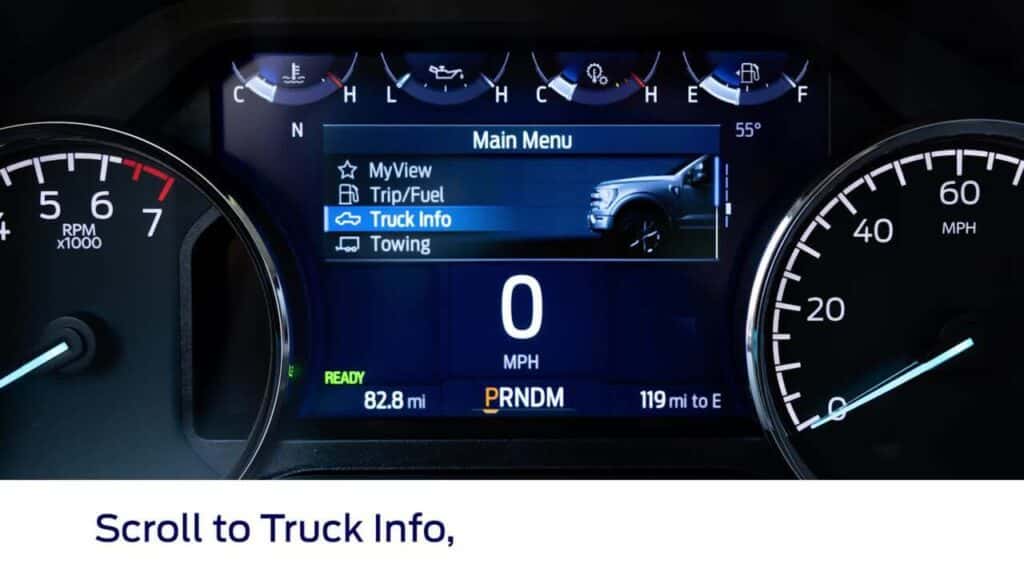
- Press the menu button on the steering wheel to pull up the instrument cluster display.
- Select Settings.
- Select Vehicle.
- Select Oil Life.
- Press and hold the OK button until the reset confirmation appears.
- Confirm the instrument cluster returns to 100% oil life.
How to Reset the Oil Life Monitoring System on a 2026 Ford Explorer
The 2026 Explorer follows a very similar process, using the information display controls on the steering wheel for the menu-based method.
Pedal-Press Method
Same steps as the F-150 above. The pedal-press procedure is identical across all three models.
Settings Menu Method
- Use the information display controls on the steering wheel; scroll to Settings and press the right arrow button.
- Scroll to Vehicle and press the right arrow button.
- Scroll to Oil Life and press the right arrow button.
- Press and hold OK until “Reset Successful” appears on the display.
- If “Not Reset” or “Reset Cancelled” shows up instead, start the procedure again from step 1.
How to Reset the Oil Life Monitoring System on a 2026 Ford Escape
The 2026 Escape uses the right-side steering wheel controls for its menu-based reset. Worth noting: the 2026 Escape is not available in CA, MA, OR, NY, WA, or VT.
Pedal-Press Method
Same steps as the F-150 section. For Escape Hybrid or PHEV models, make sure the vehicle is in Ready mode if the standard ignition-ON position doesn’t work.
Settings Menu Method
- Switch ignition ON with the engine off.
- Use the right-side steering wheel controls to enter the main menu.
- Scroll to Settings, then navigate to Vehicle or Oil Life.
- Select Oil Life to view the current percentage.
- Press and hold the OK/Reset/Select button for 3 to 10 seconds until “Reset Successful,” “Oil Life Reset,” or 100% appears on the display.
- Exit the menu and cycle the ignition OFF, then back ON to confirm.
Our service team is happy to walk you through any of these steps in person. Schedule a service appointment at ORO Ford and we’ll make sure everything is properly reset before you leave.
Common Mistakes to Avoid
Even with clear instructions, a few errors come up again and again. Here are the three most common:
- Resetting without performing an oil change. This clears the alert but leaves degraded oil sitting in your engine. The reset only belongs after a completed oil change.
- Not holding the pedals or button long enough. Releasing too early interrupts the reset sequence. Hold until you see the confirmation message on the display.
- Attempting the reset with the engine running. The engine needs to stay off throughout both reset methods. Starting it before the process is done will interfere with the procedure.
If your instrument cluster shows “Not Reset” or “Reset Cancelled” at any point, run through the full procedure again from the beginning.
Schedule Your Oil Change and Reset at ORO Ford
If you’d rather leave the reset to us, our service team at ORO Ford in Oracle, AZ handles oil changes and OLMS resets as part of every routine service visit. We make sure your system is properly reset and reading 100% before you drive off.
Trained Technicians, Genuine Ford Parts
Our technicians work specifically on Ford vehicles and use genuine Ford components. Whether you originally brought your F-150, Explorer, or Escape to us or you’re just looking for a reliable service center in the area, we’re open six days a week to fit your schedule.
And if your current F-150, Explorer, or Escape has you thinking about an upgrade, take a look at our financing and auto loan options to see what fits your budget.
Get in Touch
Questions about a system fault or an uncertain reset? Contact our team at ORO Ford and we’ll help you sort it out. Ready to book? Schedule your service appointment online and let us handle the rest.
Images by OEM

0 comment(s) so far on How to Reset the Oil Life Monitoring System on a 2026 Ford F-150, Explorer, or Escape