

How to Calibrate and Adjust the 2026 Ford Co-Pilot360 Safety Features
The 2026 Ford Co-Pilot360® is a full suite of driver-assist systems that work together as one integrated package to support safer driving near Oracle, AZ and wherever else you take your Ford. These systems only deliver on their promise when they’re properly calibrated.
Whether you’ve recently had repairs done or you’re just getting familiar with what your vehicle can do, understanding how calibration works and when to call in a professional makes a real difference. If you’d like a quick assessment of your systems, contact our service team at ORO Ford to schedule an inspection.
What Is Ford Co-Pilot360 and Why Calibration Matters
Ford Co-Pilot360 is a full suite of driver-assist technologies built into Ford vehicles to support safer, more confident driving. It includes Lane Centering, Adaptive Cruise Control with Stop-and-Go, BLIS (Blind Spot Information System) with Cross-Traffic Alert, Pre-Collision Assist with Automatic Emergency Braking, Lane-Keeping System, and available 360-degree camera views. Each feature depends on cameras and radar units that need to be precisely aligned to deliver accurate responses in real time.
When a sensor is even slightly out of position, the technology can misread road conditions, issue false alerts, or fail to respond when it matters. Ford Co-Pilot360 calibration is a real maintenance task that requires attention after certain events and ongoing awareness to stay reliable.
When Your Co-Pilot360 Systems Need Recalibration
Knowing which events are likely to knock a system out of alignment lets you act before any safety gaps develop.
After Repairs, Windshield Replacements, and Alignments
Windshield replacement is one of the most common recalibration triggers. Many cameras supporting Co-Pilot360 features are mounted at or near the windshield, and even a small positional shift in the camera bracket after glass replacement can throw off the entire system.
Suspension work and wheel alignments are another frequent cause. If your vehicle’s geometry changes, sensors mounted along the front bumper or mirrors may no longer be aimed correctly. Collision repairs involving bumper or hood work carry the same risk. Any time your vehicle’s structure or glass is disturbed, ADAS recalibration should be part of the follow-up.
Warning Signs That Calibration Is Off
Your vehicle will usually signal when recalibration is needed even without an obvious triggering event. Watch for frequent false alerts from blind-spot monitoring, Lane Centering that pulls the wheel unpredictably, or Adaptive Cruise Control that disengages without clear reason. A warning light on any driver-assist system is the clearest indicator. Erratic behavior can be subtler too: the system works sometimes and not others, or it reacts to things that aren’t there.
If you notice any of these signs, don’t wait. Contact our service team to have your Co-Pilot360 system checked before a reliability issue becomes a safety issue.
Key Driver-Assist Systems and How They Are Set Up
Each Co-Pilot360 system has its own sensors, software logic, and calibration requirements. The table below summarizes the six main systems, their calibration methods, and what triggers recalibration.
| System | Sensor Type | Calibration Method | DIY Feasibility | Common Recalibration Trigger | Professional Tool Required |
| Pre-Collision Assist with AEB | Camera + radar | Static + dynamic | No | Windshield replacement, front-end repair | Yes |
| Adaptive Cruise Control with Stop-and-Go | Camera + radar | Static + dynamic | No | Front-end repair, alignment | Yes |
| Lane Centering / Lane-Keeping System | Forward camera | Static | No | Windshield replacement, alignment | Yes |
| BLIS | Rear bumper radar | Static | No | Rear bumper repair | Yes |
| Rear Cross-Traffic Alert | Rear bumper radar | Static | No | Rear bumper repair | Yes |
| 360-Degree Camera System | Multiple cameras | Static | Partial (cleaning only) | Any camera housing disturbance | Yes |
Lane Centering and Lane-Keeping System
Lane Centering uses a forward-facing camera to detect painted lane markings and provides gentle steering inputs to keep the vehicle centered. The Lane-Keeping System alerts the driver with auditory and visual cues when the vehicle drifts without a turn signal.
For these features to work correctly, the forward camera must be calibrated to a precise angle relative to the vehicle’s centerline using a static process: a technician positions a calibration target board at a manufacturer-specified distance while connected to Ford diagnostic software.
Adaptive Cruise Control with Stop-and-Go
This system uses forward-facing radar to measure distance between your vehicle and the one ahead, automatically adjusting speed to maintain a safe following gap. The Stop-and-Go capability extends this into city traffic and highway congestion, bringing the vehicle to a complete stop if needed and resuming when traffic moves.
Calibrating the radar unit requires precise physical positioning and software alignment so the system accurately measures distances at varying speeds. A miscalibrated radar can result in over-braking or failing to slow down in time.
BLIS and Rear Cross-Traffic Alert
BLIS uses radar sensors in the rear bumper to detect vehicles in your blind zones. A lighted symbol on the side view mirror alerts the driver when a vehicle is detected in the blind zone, and the system can provide resistive steering torque to alert when leaving the lane. BLIS is generally active from around 3 mph until the vehicle is off.
Rear Cross-Traffic Alert uses the same sensor network to warn of vehicles approaching from either side while you reverse. After any rear-end repair or bumper replacement, both systems require recalibration.
How Co-Pilot360 Recalibration Works in Practice
Ford ADAS recalibration is carried out by trained technicians using specialized OEM diagnostic equipment. Static calibration is performed inside a shop with specific lighting and a level floor: technicians position calibration targets at manufacturer-specified distances, then use Ford’s diagnostic software to walk through the sequence. Some systems also require dynamic calibration, which happens while the vehicle is driven at a consistent speed on a road with clear lane markings. Certain systems need both methods to complete a full calibration cycle.
This is why recalibration can’t be replicated with generic tools. Ford specifies exact environmental conditions, target measurements, and software parameters. Straying from those specifications risks leaving a system that appears functional but is operating on flawed reference data.
DIY Adjustments vs. Professional Recalibration: What Owners Should Know
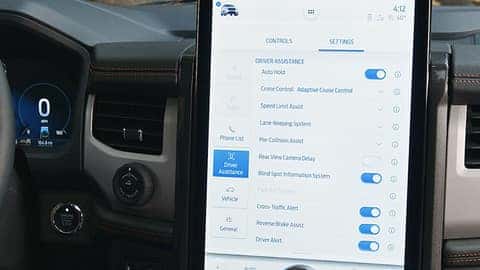
Some Co-Pilot360 settings are genuinely owner-adjustable through the vehicle’s menu. You can change alert sensitivity, adjust following distance for Adaptive Cruise Control, and toggle features on or off. Owners can also keep sensor and camera areas clean, which matters more than most drivers realize. Blocked or dirty sensors degrade performance in heavy rain, snow, glare, and low-visibility conditions.
True sensor or camera alignment is a different matter entirely. Attempting recalibration at home, without the proper target boards, diagnostic software, and a controlled environment, will likely leave the system less reliable than before. A poorly calibrated safety system can provide false confidence while failing to respond when you need it. If your system is flagging calibration errors, the safety features you’re counting on may be inactive, and you may not know it. Professional recalibration is the only responsible path beyond menu-level customization.
Schedule a Co-Pilot360 Inspection or Demo at ORO Ford
Get Your Systems Checked
If you’ve recently had windshield work, collision repairs, or an alignment performed on your Ford, getting your Co-Pilot360 system professionally inspected is a straightforward step toward making sure your safety features are working as intended. Exact calibration procedures vary by vehicle configuration, and a certified technician using Ford-approved tools is the final authority on safety-critical adjustments.
Visit or Contact Us
We’re located at 3950 W. State Highway 77 in Oracle, AZ, and our service department is experienced with Ford ADAS calibration. Our service hours are Monday through Friday, 7am to 5:30pm. To book an inspection or ask questions about your vehicle’s systems, contact our service team or call us at 520-818-3673.
If you’re considering a new Ford and want to understand your purchase options, you can also explore financing options on our website. Keeping your safety systems calibrated means the technology you’re relying on is actually ready when it counts.
Images by OEM

0 comment(s) so far on How to Calibrate and Adjust the 2026 Ford Co-Pilot360 Safety Features